Last updated: Oct. 15, 2026
IT environments change constantly. The challenge is making those changes without creating unnecessary risk, outages, or delays.
IT change management, called Change Enablement in ITIL 4, helps teams assess, authorize, implement, validate, and learn from changes that could affect an IT service. The goal is not to slow delivery. It is to improve change success while reducing disruption, recovery time, compliance risk, and impact on critical business services.
A mature practice applies control in proportion to risk. Routine, proven changes should move quickly. Higher-risk changes need deeper analysis, stronger validation, and the right level of authorization.
The issue is not whether change should move fast. It is whether teams can move fast without losing service context, control, or confidence in the outcome.
What IT Change Management Covers
An IT change is an addition, modification, or removal of anything that could directly or indirectly affect a service.
Examples include:
- Application releases
- Infrastructure updates
- Network configuration changes
- Cloud and identity policy changes
- Database updates
- Vendor upgrades
- Monitoring changes
- Infrastructure-as-code deployments
Effective change management connects technical implementation with business impact, service dependencies, timing, compliance, communication, and recovery planning.
The focus should be on outcomes, not ceremony. A good process makes safe delivery easier instead of forcing every change through the same approval path.
The IT Change Management Process
While the exact workflow varies by organization, a practical change management process can include the following eight steps.
1. Request and Record the Change
Create an authoritative change record that explains what will change, why it is needed, who owns it, when it will happen, and which services may be affected.
Include implementation steps, dependencies, risk, test evidence, validation criteria, communications, and recovery plans.
Automation can create or update the record from a pull request, deployment pipeline, or configuration platform, but the record should still show accountable ownership and business context.
2. Assess Risk and Service Impact
Risk combines likelihood and consequence.
Risk increases when a change is novel, manual, complex, poorly tested, difficult to reverse, or affects shared infrastructure and critical services.
Teams should ask:
- What could fail?
- What is the potential blast radius?
- Which services depend on the affected components?
- How strong is the test evidence?
- How quickly can the change be reversed or contained?
- What is the business impact if recovery takes longer than expected?
Service context matters because two technically similar changes can have very different business consequences.
This is where poor change decisions are often introduced. Without accurate dependency and service context, teams may understand what is changing without understanding what the change could disrupt.
3. Authorize According to Risk
The change authority should match the change’s risk and policy requirements.
Depending on the organization, that authority might be a peer reviewer, service owner, product owner, manager, automated policy gate, technical authority, or designated change authority informed by a change advisory board (CAB).
A CAB can be useful for high-impact or cross-functional changes, but it should not become a universal queue for every request.
Governance should accelerate low risk work and apply stronger controls where business exposure justifies them. It should not create the same approval burden for every change.
4. Plan, Test, and Define Validation
A strong change plan includes:
- Preconditions
- Implementation steps
- Checkpoints
- Owners
- Timing
- Expected results
- Communications
- Stop conditions
- Rollback or containment actions
Define success before implementation begins.
A deployment is not successful simply because a pipeline passes. Teams should validate customer journeys, service health, dependencies, data integrity, configuration policy, and relevant security or compliance controls.
5. Schedule and Coordinate
Scheduling helps teams avoid collisions and align changes with business priorities.
A useful change calendar should show service impact and dependencies, not just ticket numbers. Two unrelated technical changes may still affect the same customer journey or shared infrastructure.
The objective is not simply to avoid overlapping maintenance windows. It is to prevent independent changes from creating combined service risk.
6. Implement With Clear Stop Conditions
Follow the approved plan, but give teams authority to stop when the environment behaves differently than expected.
Record material deviations, decisions, automation runs, and actual start and finish times.
For progressive delivery, define guardrails such as canary scope, rollout rate, feature flags, error thresholds, and automatic or human stop criteria.
Automation should execute within defined policy boundaries, with clear approval logic, rollback criteria, and evidence of what occurred.
7. Validate From the Service Perspective
A change is successful only when the intended outcome is achieved without unacceptable side effects.
Compare the before-and-after state, verify key transactions, monitor during an observation window, and confirm that dependent services remain healthy.
Also remove temporary access, bypasses, or emergency controls that are no longer needed.
A successful deployment is not the same as a successful change. The change is complete only when teams verify that the intended service outcome has been achieved.
8. Review, Close, and Learn
Close the change with the actual outcome, validation evidence, rollback or incident links, deviations, residual risk, and follow-up actions.
Review failed, emergency, high risk, or learning-rich changes. Feed those lessons into testing, automation, monitoring, configuration policy, and future standard-change models.
The goal is not simply to document whether a change succeeded or failed. It is to improve the operating model so future changes are safer, faster, and easier to validate.
Standard, Normal, and Emergency Changes
Most organizations use three common change types.
Standard changes are low-risk, well-understood, repeatable, and pre-authorized through an approved model.
Normal changes do not meet the standard model and require risk-based assessment and authorization.
Emergency changes must move quickly to address urgent harm, such as a major incident or critical security exposure. They should still maintain appropriate ownership, evidence, recovery planning, and retrospective review, even when normal procedures are expedited.
A standard change is not simply “a small change.” It is a proven and documented change model with clear boundaries and expected results.
Metrics That Improve Change Performance
Change management metrics should help improve the system, not rank individuals.
Useful measures include:
- Change success rate
- Change fail rate
- Emergency-change rate
- Lead time for change
- Rollback or recovery rate
- Incidents caused by change
- Authorization and queue time
Segment results by service, team, technology, and risk level. A team managing critical legacy systems will naturally have a different risk profile from one deploying a stateless cloud service.
Pair speed with reliability and business impact.
High-performing teams are not optimizing for change volume alone. They are measuring whether change reaches production safely, achieves the intended service outcome, and avoids preventable disruption.
Modern Change Management for DevOps and Cloud
Change management does not need to conflict with DevOps.
CI/CD pipelines can automatically capture peer review, tests, policy checks, approvals, deployment evidence, and observability signals.
Infrastructure-as-code can make proposed state reviewable before execution, while configuration monitoring can detect out-of-band changes and drift after deployment.
The principle remains the same: automate evidence and controls wherever possible and escalate only when novelty, risk, or business impact justifies deeper review.
This shifts change management from manual gatekeeping toward policy-governed delivery.
Best Practices for Faster, Safer Change
- Apply risk-based control. Streamline proven, low-risk work and increase scrutiny as potential impact rises.
- Make service context visible. Connect technology changes to dependencies, business services, and customer journeys.
- Automate evidence, not just execution. Capture tests, approvals, identity, timestamps, telemetry, and validation automatically.
- Design for recovery. Use small batches, canaries, feature flags, backups, and tested rollback paths.
- Link changes, incidents, and problems. Shared evidence improves diagnosis and future prevention.
- Review the process itself. Remove unnecessary fields, meetings, and approval steps that do not reduce risk.
How ScienceLogic Supports Better Change Decisions
The ScienceLogic platform can provide operational context around a change while leaving authorization and risk decisions with the organization.
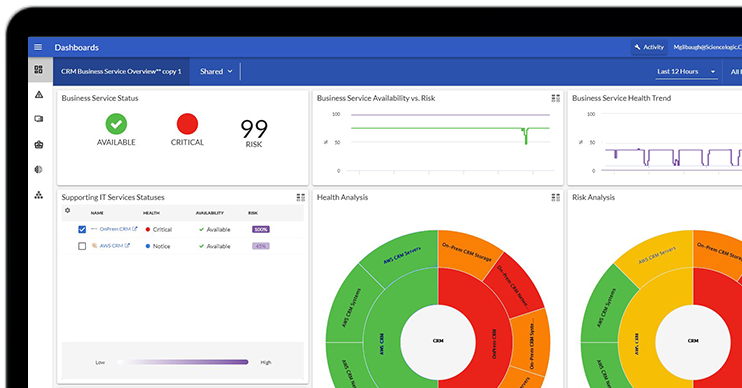
Skylar One provides discovery, topology, event, health, and service context to help teams understand potential impact and validate the environment.
Skylar Compliance provides configuration backup, change history, policy checks, audit evidence, alerting, and recovery capabilities for supported technologies.
Skylar Automation helps orchestrate approved workflows and synchronize context across ITSM, DevOps, cloud, and collaboration tools.
Together, these capabilities help teams answer four essential questions:
What is changing? What services depend on it? Does the actual state match the approved intent? Did the change achieve the intended service outcome?
The objective is not to automate approval indiscriminately. It is to give teams the service context, change evidence, policy boundaries, and validation needed to make faster, more defensible change decisions.
Turn Change Management Into a Delivery Advantage
Effective IT change management should reduce risk without creating unnecessary friction.
The mandate is no longer simply to control change. It is to enable change at the speed the business requires while protecting service reliability, compliance, and customer experience.
By combining risk-based governance, service context, automation, and reliable validation, IT teams can deliver change faster while protecting the services the business depends on.
Explore Skylar Compliance to see how ScienceLogic can strengthen configuration backup, change history, policy checks, auditing, and recovery across the change lifecycle.