According to the Information Systems Audit and Control Association (ISACA), incident management and response is “a key component of an enterprise business continuity and resilience program.” Under ISACA, incident management follows the Control Objectives for Information and Related Technologies (COBIT) framework for IT management and governance. Another popular approach to incident management is outlined by the Information Technology Infrastructure Library (ITIL) and is called ITIL incident management, which defines incident management as a way of managing the lifecycle of incidents (unplanned interruptions or reductions in quality of IT services) in order to restore affected services as quickly as possible.
IT incidents are inevitable. Prolonged disruption does not have to be.
An effective IT incident management process gives teams a repeatable way to detect issues, understand business impact, coordinate response, restore service, and learn from what happened. The goal is simple: return services to normal as quickly and safely as possible while minimizing disruption.
The 8 Steps of the Incident Management Process
- Detect and identify
- Log the incident
- Categorize
- Prioritize
- Assign and escalate
- Diagnose
- Resolve and recover
- Close, review, and improve
Step 1: Detect and Identify the Incident
Incidents may be reported by users, service desk teams, suppliers, synthetic tests, observability platforms, security tools, or automation.
Detection is only the start. Teams must determine whether a signal represents a real service issue, a duplicate, an expected condition, or an event that requires monitoring rather than immediate action.
Strong detection includes context such as the affected service, user or transaction impact, first observed time, recent changes, and related signals. A technical alert alone may not reveal urgency. Connecting that alert to a business service gives responders the context they need to act.
The issue is not simply whether an alert exists. It is whether teams can determine quickly what is affected and whether the signal represents meaningful service impact.
Step 2: Log One Authoritative Incident Record
Create an incident record as early as possible and maintain it throughout the response.
Capture key information such as:
- Symptoms and timestamps
- Affected services
- Impact and urgency
- Current owner
- Related events and recent changes
- Investigation activity
- Communications
- Resolution evidence
Avoid duplicate records that fragment evidence or confuse ownership. For major incidents, maintain one operational timeline and one source of truth for status.
A consistent incident record gives every responder access to the same evidence, reducing handoff friction and preventing important context from being lost as the incident moves between teams.
Step 3: Categorize Consistently
Consistent categorization improves routing, reporting, knowledge search, trend analysis, and problem management.
Useful categories may include business service, technology domain, component, and symptom. Avoid asking analysts to identify a root cause during intake when the evidence is still incomplete.
Review categories regularly. If too many incidents are classified as “other,” the taxonomy may no longer reflect how services and teams operate.
Step 4: Prioritize by Impact and Urgency
Priority determines how quickly teams respond, escalate, and communicate.
Start with two questions:
Impact: How many users, services, locations, or business processes are affected?
Urgency: How quickly will the impact become unacceptable?
Priority should also consider service criticality, revenue, customer scope, safety, security, regulatory obligations, contractual commitments, and whether a workaround exists.
Major-incident criteria should be clear before an outage occurs. That helps teams mobilize quickly instead of debating severity while impact expands.
High-performing teams are not prioritizing by alert severity alone. They are prioritizing by service and business consequence.
Step 5: Assign, Escalate, and Establish Command
Assignment identifies who owns the next action. Escalation brings in additional skill, authority, or resources.
For major incidents, assign an incident manager or incident commander to coordinate the response, remove blockers, manage escalation, and maintain communication cadence.
The incident lead should not also be expected to perform every troubleshooting task. Separating coordination from technical investigation allows specialists to focus on recovery.
Typical roles include:
- Service desk: Intake, validation, routing, and user communication
- Incident manager: Coordination, escalation, and response cadence
- Resolver teams: Investigation, remediation, and validation
- Service owner: Business impact and service accountability
- Communications lead: Stakeholder updates
- Suppliers: External product or platform support
Clear ownership shortens the path between detection and action. When roles are ambiguous, escalation becomes the default and response slows.
Step 6: Diagnose Using Service Context
Diagnosis should reduce uncertainty systematically.
Start with the user-visible symptom and affected service, then examine:
- Dependencies and topology
- Recent changes
- Events, metrics, logs, and traces
- Configuration history
- Capacity
- Previous incidents and operational knowledge
Service context helps responders avoid chasing the loudest alert when it is not the real cause.
Instead of asking only, “Which alert fired first?” ask:
“What changed in the dependency path of the affected service, and what evidence best explains the user impact?”
That shift from device-centric monitoring to service-centric investigation can improve response speed and accuracy.
This is where investigation delay is often introduced. Without topology, change history, and service relationships, responders must reconstruct context manually before they can form a defensible probable-cause hypothesis.
Step 7: Resolve, Recover, and Validate
Resolution addresses or bypasses the immediate failure. Recovery means the service has returned to an acceptable, stable state.
A restart may restore service without fixing the defect. A failover may reduce impact while a supplier investigates. A rollback may be safer than continuing a failed change.
Before declaring recovery, validate the result from the customer or transaction perspective. Confirm that critical journeys work, error rates and latency have normalized, dependencies are stable, and monitoring shows no immediate recurrence.
Recovery is not complete when an action executes successfully. It is complete when the service outcome has been verified.
Step 8: Close, Review, and Improve
Closure should mean more than changing a ticket status.
Confirm that service is restored, stakeholders have been updated, monitoring is normal, and temporary workarounds have clear owners.
Major incidents and repeat failures should also trigger a post-incident review (PIR). A useful review asks:
- What happened and what was the impact?
- How quickly was the incident detected and restored?
- What technical or process conditions contributed?
- What made the incident harder or longer to resolve?
- Which corrective actions will reduce future risk?
- Who owns those actions, and how will success be verified?
The goal is not simply to document the incident. It is to turn lessons learned into measurable operational improvement.
Incident Management Metrics That Matter
No single metric captures incident management quality. Common measures include:
- Mean time to detect (MTTD)
- Mean time to acknowledge (MTTA)
- Mean time to restore or resolve (MTTR)
- SLA breach rate
- Recurrence or reopen rate
- Escalation rate
- Customer or business impact
Be precise with MTTR. Organizations use the acronym differently, so define the start and stop points clearly.
The most useful question is not simply whether MTTR is falling. It is where time is being consumed across detection, acknowledgment, investigation, remediation, recovery, and verification.
Where Automation and AI Add Value
Automation is most effective when it removes repetitive work while preserving human judgment for ambiguous or high-risk decisions.
Useful automation includes:
- Deduplicating and correlating alerts
- Identifying affected services
- Enriching incident tickets
- Routing work to the right team
- Gathering diagnostics
- Sending notifications
- Triggering approved workflows
AI can add another layer by summarizing evidence, identifying likely issues, comparing current conditions with previous incidents, and recommending next steps.
High-impact actions should remain permission-controlled, explainable, auditable, and governed.
Without context and guardrails, speed can increase risk. With service context, approval logic, and verification, automation can shorten response time while preserving control.
How ScienceLogic Supports the Incident Lifecycle
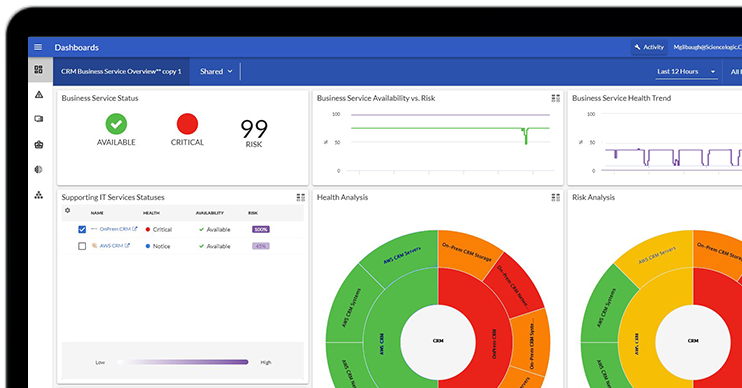
ScienceLogic helps IT teams connect infrastructure signals to the services that matter to the business.
Skylar One provides service-centric observability and topology across hybrid and multi-vendor environments, helping teams understand what is affected and where to focus.
Skylar Advisor turns telemetry, tickets, and operational knowledge into prioritized, explainable guidance to support investigation and probable root-cause analysis.
Skylar Automation connects IT operations with ITSM, DevOps, cloud, and collaboration tools to help teams execute repeatable workflows with appropriate governance.
Together, these capabilities support an observe, advise, and automate approach, turning operational data into service-aware insight and governed action.
The objective is not to replace operator judgment. It is to shorten the path from signal to service impact, probable cause, trusted action, and verified recovery.
Incident Management Best Practices
- Design around services and business impact.
- Separate incident command from troubleshooting.
- Automate context before remediation.
- Make priority definitions practical and specific.
- Keep runbooks and operational knowledge current.
- Track corrective actions through verification.
- Practice major-incident response before a real outage occurs.
Move From Reactive Response to Intelligent Operations
A mature incident management process does more than help teams close tickets faster. It gives responders the context, coordination, and intelligence needed to protect service availability and improve resilience over time.
The mandate is no longer simply to restore service after disruption. It is to reduce decision latency, prevent avoidable escalation, verify recovery, and apply what teams learn so the same failure is less likely to create customer-visible impact again.
By combining service-centric observability, AI-guided investigation, and governed automation, IT teams can reduce manual triage, improve handoffs, and restore service with greater confidence.
Ready to see intelligent incident management in action? Explore the Incident Management Automation product tour and discover how ScienceLogic can help reduce manual effort and accelerate service restoration.