AI models can reason over language, summarize findings, and explain patterns. What they cannot do on their own is see the real-time operational state of your environment. Ask a model about a critical incident and it will answer from whatever context it is given, which means the answer is only as trustworthy as the input. In operations and compliance workflows, an answer is only useful if it is grounded in current service context and governed access to the systems that define reality.
The question is not whether an agent can generate an answer. It is whether that answer reflects operational truth.
Model Context Protocol (MCP) closes that gap. It gives AI agents a standardized, secure way to query and act on real systems. With the latest release of Skylar Automation, an MCP server is built directly into the platform. No separate infrastructure to stand up, no repository to clone and host. Upgrade, install the relevant SyncPacks, and the MCP server is ready. Connecting your agent takes just a few simple configuration steps. Any MCP-compatible client works, including Claude, VS Code, GitHub Copilot, and Pydantic AI.
This release ships MCP tools across three Skylar products: Skylar Automation for triggering workflows, Skylar One for live operational visibility, and Skylar Compliance for configuration and policy data. Here is what each unlocks.
Trigger Any Workflow by Name
The Skylar Automation BaseSteps SyncPack gives agents the ability to trigger any Skylar Automation workflow by name, turning a natural language request into actual operational execution. Whether it is an incident response runbook, a remediation sequence, or a provisioning flow, an agent can initiate it on demand without anyone navigating the platform.
This means an agent does not just surface information. It can act on it.
Query Your Live Operational State
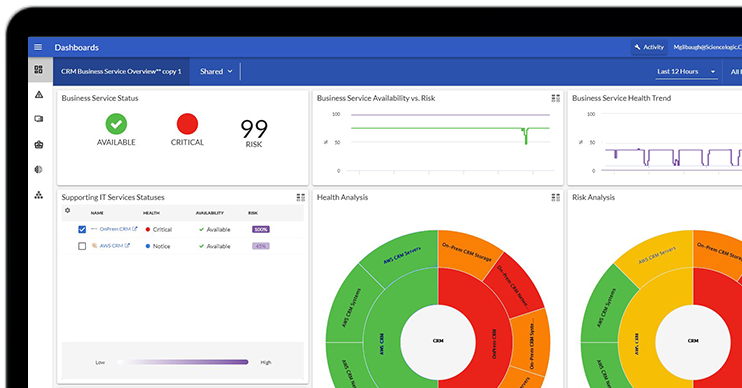
The Skylar One Base SyncPack connects agents to live operational data. Query monitored devices by severity, device class, or collector group. Pull active events filtered by device or severity. Retrieve asset details like software version and hardware specs. Surface business services by health, risk, or availability. Check appliance status across your environment. No dashboard navigation required. The agent queries your actual operational state and returns structured, accurate answers.
Compliance and Configuration on Demand
The Skylar Compliance SyncPack adds over a dozen tools for configuration visibility and policy enforcement. Test any device against its compliance rules. Compare two configuration backups to detect drift. Pull the full backup history for any device, or retrieve specific configuration lines. Review running and historical jobs. Browse all active compliance policies. The kind of investigation that normally requires several screens and manual correlation happens in a single exchange.
What This Looks Like in Practice
Scenario: Your customer portal drops to a critical health state. The on-call team needs to understand what happened, which systems are involved, and whether a recent change is to blame.
With MCP tools connected to your Skylar environment, an agent works through the full investigation in a single conversation:
- Scope the impact. Pulls all critical business services to confirm which are affected.
- Identify the devices. Surfaces the infrastructure tied to the affected service.
- Find the trigger. Queries active events to determine what caused the degradation.
- Check asset state. Reviews software versions and collector placement for impacted devices.
- Look for recent changes. Checks whether any configuration changes occurred before the incident.
- Find exactly what changed. Diffs the last two configuration backups to pinpoint the specific change.
The agent handles the underlying tool calls automatically, assembling the evidence path a practitioner would otherwise navigate by hand.
The business service is critical because an underlying device entered a fault state following a routing change in the most recent configuration backup, one that was absent from the previous version. Root cause, in one conversation. No context switching. No manual correlation.
What This Means for Your Team
This shifts the mandate for operations teams. Connecting an agent to a chat window is no longer the goal. The goal is connecting it to governed, real-time operational context so its recommendations can be trusted and acted on.
Teams can ask natural language questions and receive structured, context-aware answers without navigating multiple systems. Operational data, compliance posture, configuration history and service health all come together in one workflow, reducing the context switching that compounds investigation delay. And because agents draw directly from your actual environment, the answers they surface are grounded in what is really happening, not what a model infers from incomplete input.
The value is not convenience alone. It is speed with context, the kind that helps teams act faster without sacrificing accuracy or accountability.
SyncPacks Expand Agent Capabilities Automatically
Every SyncPack you install adds new tools to the MCP server without any agent-side reconfiguration. Install a SyncPack today and new sessions started afterward have immediate access to those tools, with no config file edits or integration code required. The Skylar Compliance SyncPack alone adds over a dozen tools. As your Skylar environment grows, so does what your agent can do.
And it is not limited to Skylar products. Using the SyncPack SDK, you can build custom SyncPacks with MCP tools for any system in your stack: a ticketing platform, a cloud provider, an internal tool. If your team works with it, your agent can too.
Governed Access Is What Makes Action Safe
Letting an agent trigger workflows raises the stakes of access. The same connection that shortens investigation can execute change, so the controls around it are not optional. Teams need to define which tools are exposed, which actions require approval, how credentials are managed, and how every agent-initiated action is logged and reviewable. For compliance-sensitive workflows, traceability is what lets teams explain how a conclusion was reached and what data informed it. Treated as a governed connection layer rather than an open door, MCP is what turns agent-assisted investigation into accountable decision support, so increased speed does not compound risk.
The next phase of agentic operations will not be defined by models alone. It will be defined by the quality of the context, the controls, and the operational truth those models can draw on. By connecting agents to trusted, service-aware operational and compliance data under governed access, ScienceLogic helps teams move beyond generic model output toward decision-ready insight grounded in the real state of the environment.
Get the Release
If you are already running Skylar Automation, you are a few steps away from connecting your first agent. Skylar Automation v3.4.0 is available now. Download the release and compatible SyncPacks, including the Skylar One Base SyncPack and Skylar Compliance SyncPack, from the ScienceLogic support site. Each SyncPack’s release notes cover version requirements and upgrade paths.
Start with one workflow, a critical service investigation or a configuration comparison, and assess where governed MCP access shortens the path from signal to service impact, probable cause, and trusted action.
Prefer to experiment first? The public MCP servers for Skylar One and Skylar Compliance are open source and available on GitHub at github.com/ScienceLogic/mcp. Clone the repo, connect your preferred agent, and start exploring against real data. It is the fastest way to build confidence in what is possible before your production rollout.
Questions or feedback? Join the conversation in our community forums on Nexus.